Redeem
Language
- English
- Deutsch
- Nederlands
- Français
- Español
- Català
- Italiano
- Português
- Norsk
- Suomi
- Svenska
- Dansk
- Čeština
- Magyar
- Română
- 日本語
- 简体中文
- 繁體中文
- العربية
- Polski
- Ελληνικά
- Русский
- Türkçe
- Български
- العربية
- 한국어
- עברית
- Latviski
- Українська
- हिन्दी
- Bahasa Indonesia
- Bahasa Malaysia
- ภาษาไทย
- Eesti
- Hrvatski
- Lietuvių
- Slovenčina
- Srpski
- Slovenščina
- Tiếng Việt
- Filipino
- Íslenska
What devices support eSIM?
Below is a short list of devices that support eSIM. *It is not a complete list. There are many more eSIM compatible devices in the market and new devices are constantly released.
iPhone
- iPhone 16, 16 Pro
- iPhone 15, 15 Plus, 15 Pro, 15 Pro Max
- iPhone 14, 14 Plus, 14 Pro, 14 Pro Max
- iPhone 13, 13 Mini, 13 Pro, 13 Pro Max
- iPhone 12, 12 Mini, 12 Pro, 12 Pro Max
- iPhone 11, 11 Pro, 11 Pro Max
- iPhone XS, XS Max
- iPhone XR
- iPhone SE (2020, 2022)
iPad
- iPad Pro 12.9-in (3rd, 4th, 5th, 6th generation)
- iPad Pro 11-in (1st, 2nd, 3rd, 4th generation)
- iPad Air (3rd, 4th, 5th generation)
- iPad (7th, 8th, 9th, 10th generation)
- iPad mini (5th, 6th generation)
Important
iPhones purchased in China or Hong Kong are not eSIM compatible at the time of writing, except for iPhone 13 mini, iPhone 12 mini, iPhone SE 2020, and iPhone XS. For tablets, eSIM4Travel only supports cellular-enabled (WiFi + Cellular models) eSIM-compatible models.
How to check if my Android device supports eSIM?
Below are some steps we were able to collect to check if your device supports eSIMs. This may or may not apply to your device. You can also directly reach out and ask your device manufacturer, vendor or main carrier.
Samsung devices
- 1. Go to Settings> Connections> SIM card manager> Add Mobile plan
- 2. If the “Add Mobile plan” is available, it should mean that your device supports eSIMs.
Remember to contact Samsung support to confirm if the above steps are possible for your device.
Pixel devices
- 1. Go to Settings >> Network & Internet
- 2. Tap the ‘+’ sign across SIMs. If the Connect to Mobile network page has a “Download a SIM instead?” option, this means that your device is eSIM compatible.
Remember to contact Google Pixel support or your vendor or main carrier to confirm if the above steps are possible for your device.
Other Android devices
- 1. Dial *#06# and press the call
- 2. In case your device is eSIM compatible, you should be able to view your device’s eSIM unique identification number (EID).
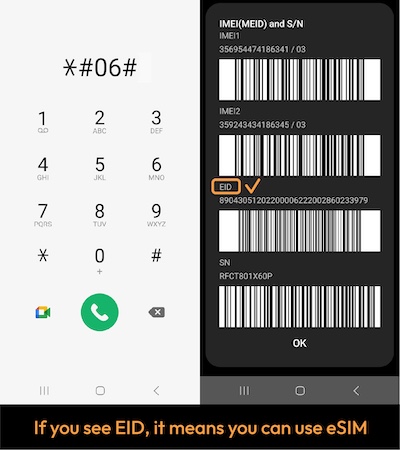
Remember to check with your device manufacturer, vendor, or primary carrier to confirm eSIM compatibility if the above steps weren't conclusive.
Do you want to sign out?